From a night of frames to a base image
NightScape Lab is a desktop app I built for nightscapes on macOS, Windows & Linux. Sort the night in Frames, develop it in Process, and Stack Frames writes a 16-bit TIFF base image.
Frames
Your library. Import a night, sort lights from darks, choose what goes in.
- 1Import the night.
- 2The engine reads each frame's actual sensor brightness and pre-sorts your lens-cap darks from your sky frames. No naming conventions, no manual tagging.
- 3Lights and darks stay with the night you imported. Choose what goes in.


Process
Develop RAWs into color-managed base images you keep editing. Each step lands as its own layer.
- 1White Balance. Neutralizes the color cast using sky-background star sampling, applied as its own layer so you can pull back its opacity.
- 2Defringe. Purple and green chromatic fringes, SCNR color-cast cleanup, and star-color neutralization, with star cores protected. (Fix lateral CA in your RAW developer first. I don't pretend to.)
- 3Presets. Save your sliders and NightScape steps with your exact settings and apply them to the next image with one click. The steps run in order, each one working on the result of the one before.
Masking
Sky and ground masks you can preview, paint and reuse.
- 1Preview Sky Mask shows the sky and ground split.
- 2Paint the mask, then reuse it.
- 3The shared sky mask is a full-resolution AI segmentation mask, dark-foreground-aware. It carves tree branches and rock spires back out of the sky.
- 4The sky mask feeds every tool that needs to know where the sky is, including Stack Frames.

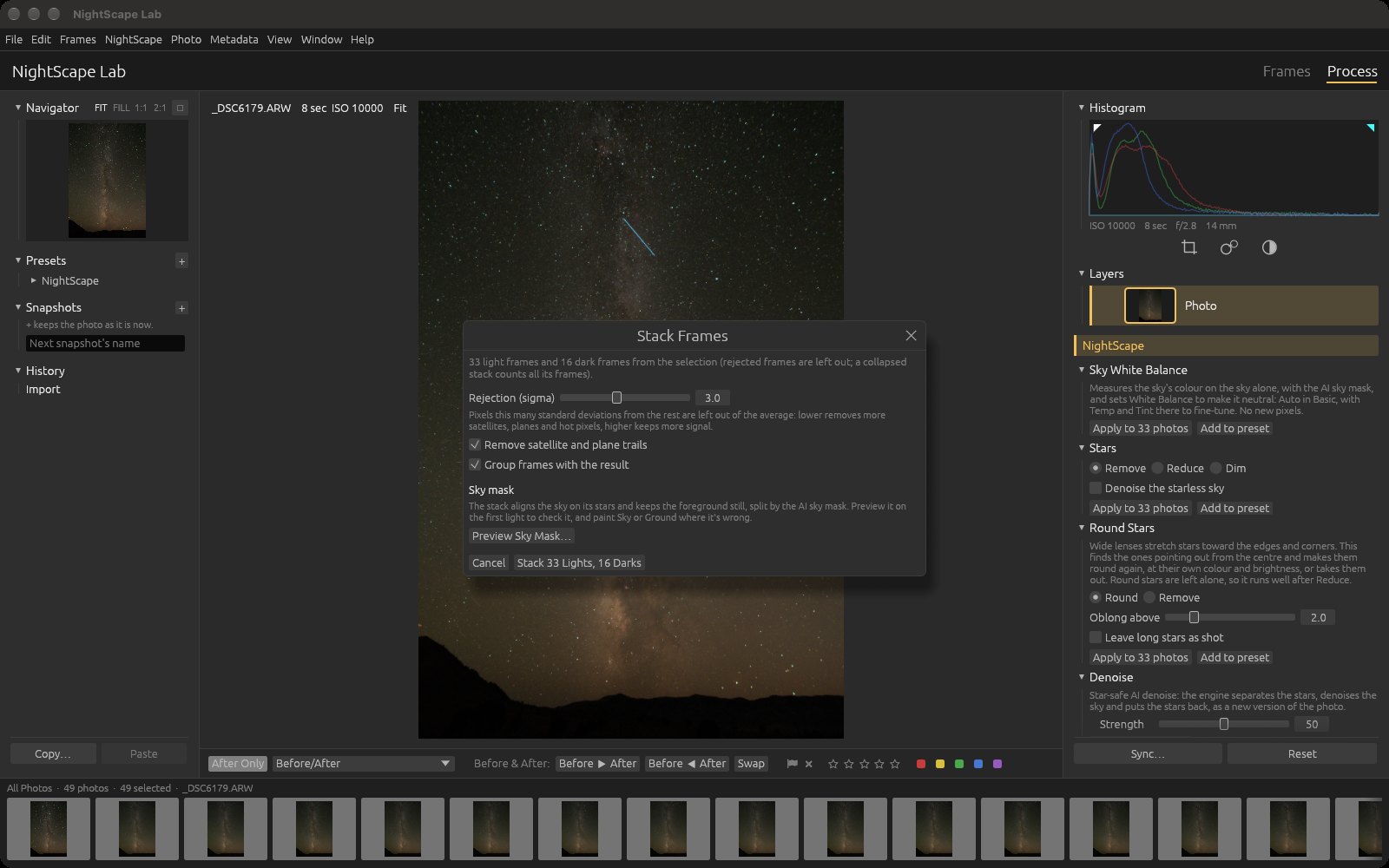
Stack Frames
Stack Frames aligns the sky and the ground separately, using the sky mask from Masking, and writes one 16-bit TIFF base image.
- 1Pick the lights and darks. Darks are auto-sorted in Frames.
- 2The sky mask separates sky from ground.
- 3The sky aligns on stars while the ground stays put, in one pass, with two-pass kappa-sigma rejection.
- 4The result opens as a new 16-bit TIFF base image.
It is deterministic: the same input produces the identical output, byte for byte. New to this? Here's how to stack a Milky Way photo.
Read the Stack Frames chapter See Stack Frames on my photosStar Trails
Star Trails in the app builds five looks from a fixed camera: Solid, Comet, Meteor, Fade, or Vortex.
- ✓Sequence-scaled trails with gap filling and star-point heads over a clean, noise-rejected foreground.
- ✓Built for volume. Hundreds of full-resolution RAWs in minutes.
- ✓Same delivery. The finished trail image is a base image.
One honest guardrail: trails need a fixed camera. Feed the engine tracker-aligned frames and it refuses, and tells you why.
Read the Star Trails chapter See Star Trails on my photos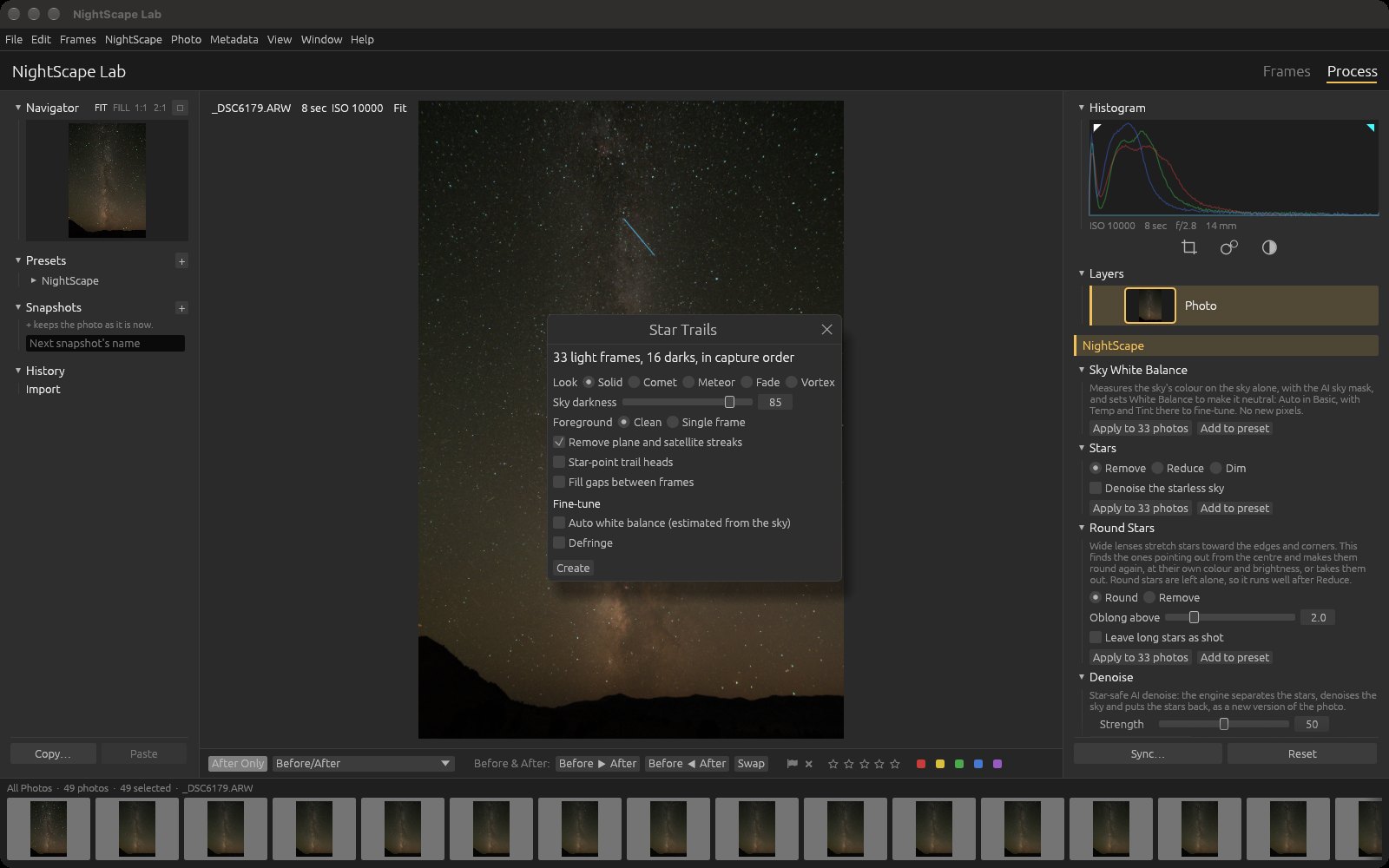


Foreground Sky Merge
Foreground Sky Merge puts the sky from one file over the foreground of another and matches the color across the horizon.
- 1Use two exposures of the same scene, or a creative composite with an unrelated sky.
- 2Edge-aware matting follows the horizon. Statistical color reconciliation matches the two plates.
- 3The result is a layered, editable document: foreground, sky, and mask as separate layers. It is fully signed, so every Lab tool works on the merged result too.
Panorama
Panorama stacks each panel and stitches the panels into one picture.
- 1Stacks each panel first.
- 2Stitches on the stars, aligning sky and ground separately.
- 3Writes one wide 16-bit TIFF base image.


Remove, reduce or dim the stars
An AI model separates the stars from the sky, and the foreground stays untouched. Remove takes the stars out and gives you a starless layer plus a Star Map layer with just the stars, so you can bring them back. Reduce shrinks the stars up to the size you set and leaves the bigger ones. Dim turns every star down by the same share and keeps the brightest cores.


Round Stars
Wide lenses stretch stars toward the edges and corners of the frame. At 14mm a star near the corner can come out as a short streak pointing away from the center, even on an expensive lens, and stacking doesn't fix it because every frame has the same shape in the same place.
- 1It finds the stars that are stretched along a line out from the center of the frame.
- 2It makes those stars round again, at their own color and brightness.
- 3Stars that are already round are left alone. The default only touches stars more than twice as long as they are wide.


The pipeline under the hood
The through-line is true sensor color, scene-linear math, and results that stay editable. (Why that matters: the case for a clean linear base image.) The measured numbers, from noise to panorama seams, are on the numbers behind NightScape Lab.
RAW-true development
LibRaw demosaic (AHD) directly into linear ProPhoto RGB: wide gamut so deep hydrogen-alpha reds and OIII teals survive, linear so the math is physically meaningful.
Calibration
Master dark construction with temporal outlier rejection, applied pre-demosaic at the Bayer level. Real sensor-space calibration, not a layer trick.
Alignment
Star detection, triangle matching, RANSAC, then thin-plate-spline warping. Parallelized and byte-deterministic.
Stacking
Two-pass Welford + kappa-sigma rejection with dual sky/ground accumulation driven by the AI sky mask: the sky aligns on stars while the ground stays put, in one pass.
AI models, all local
Sky segmentation and star removal run as ONNX models on your machine (Core ML accelerated on Apple Silicon Macs).
Output
16-bit TIFF, correct ICC profile embedded, signed, non-destructive, and delivered where your workflow expects it.
Included extras
The app runs on your machine: macOS, Windows & Linux. No upload, no account for processing, and your images never leave your computer. A Lightroom Classic plugin and a Photoshop panel come along on macOS & Windows. One $129 purchase covers all of that.
Lightroom Classic plugin
- ✓On macOS & Windows, select a night's RAW frames, lights and darks together, in any order, and choose Stack in NightScape from Library → Plug-in Extras. The same menu can send a night to Star Trails.
- ✓The stacked base image saves next to your source RAWs, imports into your Lightroom catalog automatically, and opens in Photoshop.
- ✓Stacked frames show up in Frames.
Photoshop panel
- ✓An included extra for Photoshop 2023+, on macOS & Windows.
- ✓Hand the sky mask over as a layer. Paint pure black and white on the Sky Mask layer and click Restack with edited mask.
- ✓You can also stack layers already open in Photoshop.
Get notified when NightScape Lab ships.
I'll email you when you can buy it. No trial.
30-day money-back guarantee. If it's not for you, email for a full refund, no questions asked.
What NightScape Lab is
NightScape Lab is a desktop app for macOS, Windows & Linux that takes a night of RAW frames from the card to finished base images, without going back and forth between Lightroom and Photoshop.
- Frames: import a night from a card or a folder, with lights and darks sorted for you, then flag, rate and cull.
- Stack Frames: calibrated stacking with darks, and a sky mask you can check and paint before you restack.
- Star Trails, Panorama and Foreground Sky Merge, all from the NightScape menu.
- Process: Sky White Balance, tone, curve, HSL, crop and straighten, sky and ground masks, Defringe & SCNR, Denoise, and Stars to remove, reduce or dim them.
- Export to JPEG, TIFF or PNG, or keep the 16-bit linear base image.