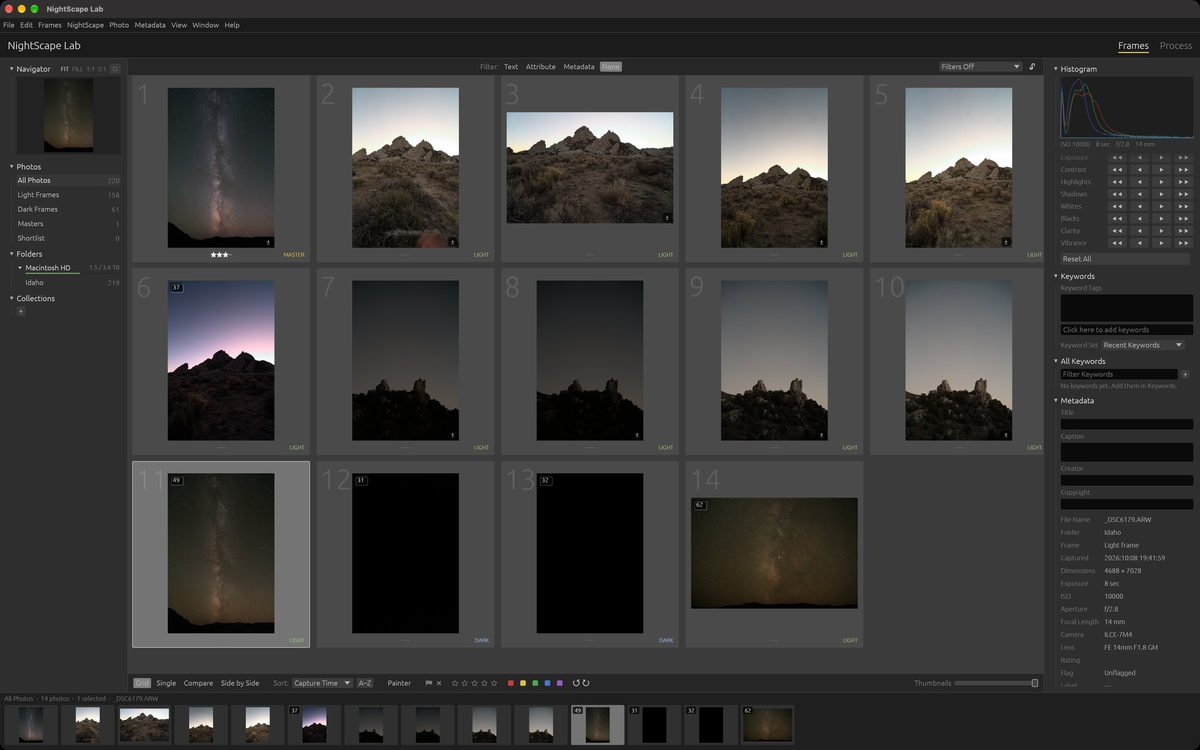
There is no single best stacker. There is the one that fits how you shoot and how you like to edit. Below is a fair look at the main landscape-astro and deep-sky options I compare on this site, with NightScape Lab included as coming soon.
If you already know you want a nightscape workflow in one desktop app, skip to how NightScape Lab works. If you want feature-by-feature tables against the landscape-astro field, see all comparisons.
| Software | Platform | Price | Nightscape vs deep-sky | Foreground handling |
|---|---|---|---|---|
| DeepSkyStacker | Windows | Free | Deep-sky | ✗ sky only |
| Sequator | Windows | Free | Nightscape | ✓ fixed ground |
| Siril | macOS, Windows & Linux | Free | Deep-sky | Manual masks |
| Starry Landscape Stacker | macOS | $39.99 | Nightscape | ✓ built in |
| PixInsight | macOS, Windows & Linux | €300 (~$323) | Deep-sky | Scripts & masks |
| NightScape Lab (coming soon) | macOS, Windows & Linux | $129 at launch | Nightscape | ✓ dual-stream stack |
Free options
- Sequator on Windows is where I send people who want a free nightscape stack tonight: stars aligned, fixed foreground sharp, almost no learning curve.
- DeepSkyStacker is the classic free deep-sky stacker on Windows: serious calibration, no landscape foreground split.
- Siril is free on macOS, Windows & Linux, with a full calibration and processing suite aimed at deep-sky work (nightscapes are possible, with a steeper ramp than Sequator).
On a Mac
- Starry Landscape Stacker is the mature one-click nightscape stacker on macOS; at $39.99 on the Mac App Store it is the default answer when someone says "I only want to stack on a Mac and be done."
- Starry Sky Stacker ($24.99 on the US Mac App Store) is the tracked deep-sky sibling from the same developer: not a landscape tool, but Mac shooters pairing a tracker with wide field sometimes live there.
DeepSkyStacker
The venerable free workhorse of deep-sky stacking on Windows. It handles lights, darks, flats, and bias frames with serious calibration options and has stacked more nebulae than anything else on this list. It is built for the telescope-and-tracker crowd, not for landscapes. There is no foreground handling and no finishing in one app. Best for: Windows deep-sky imagers who want proven, free calibration and stacking. See the full NightScape Lab vs DeepSkyStacker comparison.
Sequator
A free Windows favorite for nightscapes specifically. It is fast, friendly, and genuinely good at aligning a starry sky over a fixed foreground with minimal fuss: a superb one-click entry point for landscape astro. It stacks; it does not finish, so color and stars are still on you afterward. Best for: Windows photographers who want a free, quick, no-friction nightscape stack. See the full NightScape Lab vs Sequator comparison.
Siril
A powerful, free, cross-platform astro suite that does far more than stack: calibration, registration, background extraction, color calibration, and scriptable processing. The trade-off is a steep learning curve aimed at deep-sky work rather than landscapes. Best for: patient enthusiasts who want deep-sky power for free and do not mind the ramp. See the full NightScape Lab vs Siril comparison.
Starry Landscape Stacker
The mature, excellent one-click nightscape stacker on macOS. It is fast, reliable, and beloved for a reason: point it at your frames and it produces a clean stacked sky over a sharp foreground with almost no decisions to make. It is a stacker, not a finisher, and its output file is designed for its own workflow rather than for hand-editing in Photoshop. Best for: Mac shooters who want the "stack it, done, don't touch it" experience. See the full NightScape Lab vs Starry Landscape Stacker comparison.
PixInsight
The deep-sky powerhouse. If you are chasing faint galaxies and want total control over every stage of calibration and processing, nothing here matches its depth. That power comes with a €300 license and a famously steep learning curve, and it is overkill (and not landscape-oriented) for a Milky Way over a ridge. Best for: serious deep-sky imagers who want maximum control and will invest the time. See the full NightScape Lab vs PixInsight comparison.
NightScape Lab
Mine, and I will be straight about where it fits. NightScape Lab is a desktop app ($129 one-time at launch, coming soon) that does landscape-optimized dual-stream stacking and the core nightscape finish (Sky White Balance, Defringe, star removal and reduction, and the color-matched Foreground Sky Merge) on a clean 16-bit linear base image. Stack Frames reads RAW files from disk. The included Lightroom Classic plugin can send a night from the catalog and bring the base image back. Masking lets you paint the sky mask and restack. Star Trails, five looks, is built in. On the raw stacking metrics against a good one-click stacker the margins are modest; I would rather claim "as good or a little better, and the right deliverable." The app runs on macOS, Windows & Linux. A Lightroom Classic plugin and a Photoshop panel are included extras on macOS & Windows. 30-day money-back guarantee at launch. No trial while checkout is closed.
Best for: the hands-on landscape astrophotographer who wants to stack and finish in one desktop app, with or without Lightroom Classic.
How to choose: If you want free and one-click, Sequator (Windows) or Starry Landscape Stacker (Mac) are excellent. If you are a deep-sky imager, DeepSkyStacker, Siril, or PixInsight are your world. If you want to stack and finish a nightscape in one desktop app, on a clean linear base image, that is the gap NightScape Lab fills.
Coming soon
If stacking and finishing a nightscape in one desktop app is what you have been missing, NightScape Lab is one $129 purchase when it launches. No subscription. The demos and before/after crops on this site are how you judge it first.
30-day money-back guarantee. If it is not for you, email for a full refund, no questions asked.